How to Search Amap in Chinese When You Only Know the English Name
By ChinaCopilot · Updated 2026-08-10
Last updated: 2026-08-10 · Applies to: Mainland China + Hong Kong · Not legal or visa advice
If you type “Forbidden City” or “The Bund” into Amap (高德地图) in English, you often get nothing useful—or the wrong POI. Drivers, hotel staff, and delivery apps expect Chinese names. This guide explains why that happens, how to convert English place names safely, and how to open the correct spot in Amap.
Quick answer: Use Chinese search keywords from an official Amap Place Search lookup, confirm the English label matches what you mean, then copy the Chinese name for your driver or tap Open in Amap.
Why English fails on Amap (and in taxis)
- Amap indexes POIs in Chinese. English appears inconsistently on international hotels and airports—not on every noodle shop or metro exit.
- Same English name, many places. “People’s Square” exists in more than one city. Scope your search by city when you can.
- Taxi apps want characters. Showing pinyin alone often slows the driver down; Chinese characters on your phone work best.
- Hong Kong vs mainland. Some names differ (e.g. “Victoria Peak” vs 太平山顶). Pick the right city scope.
ChinaCopilot does not scrape Dianping, Google Maps, or social reviews. Place-name help uses official Amap Web Service APIs plus a small curated list of famous landmarks—always pick the match that fits your intent.
Step 1 — Try the landmark keyword (fast path)
For well-known sights, a short Chinese keyword is enough in Amap:
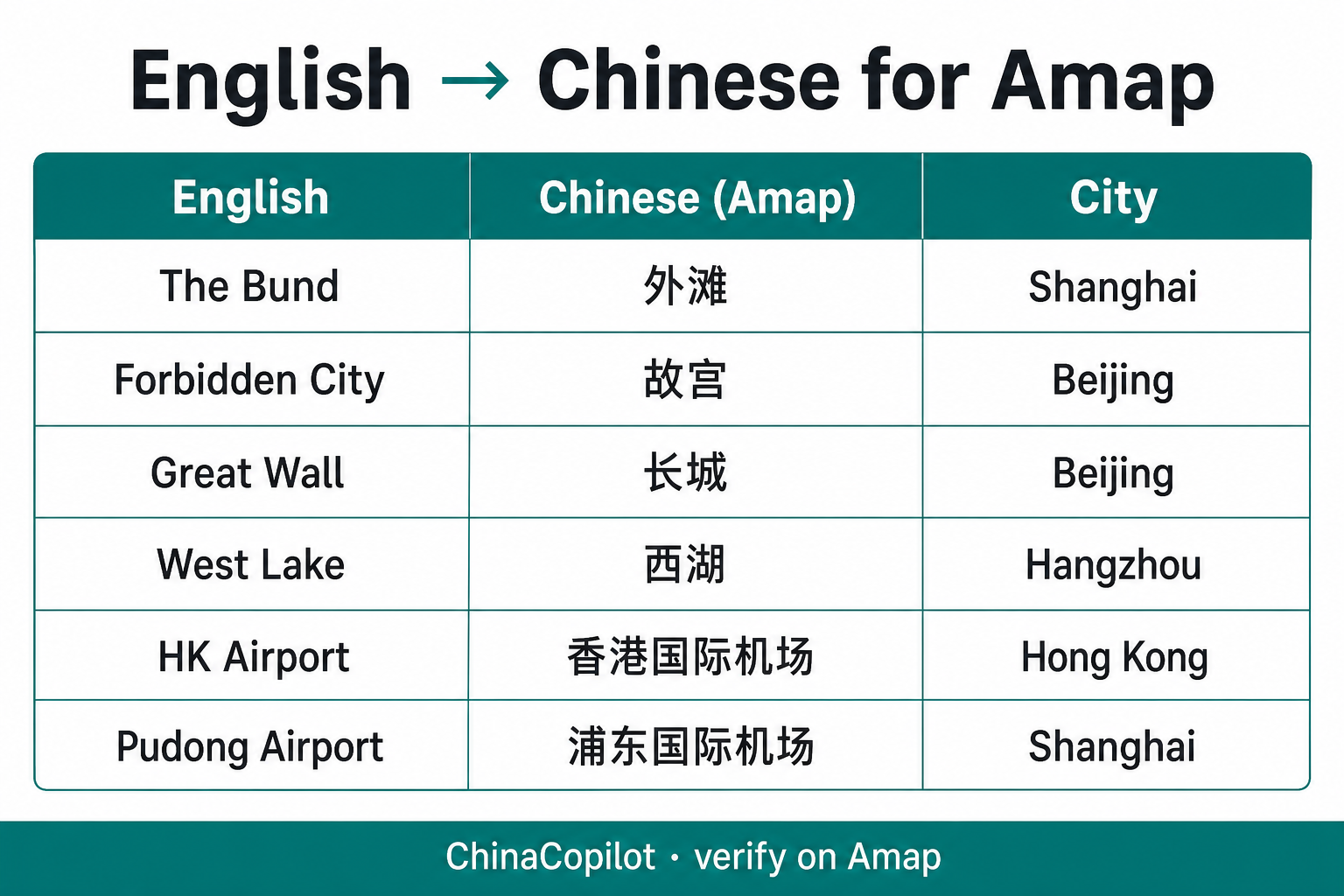
| You say (English) | Search in Amap (Chinese) | City hint |
|---|---|---|
| The Bund | 外滩 | Shanghai |
| Forbidden City / Palace Museum | 故宫 | Beijing |
| Great Wall (Badaling area) | 长城 | Beijing |
| West Lake | 西湖 | Hangzhou |
| Hong Kong International Airport | 香港国际机场 | Hong Kong |
| Shanghai Pudong Airport (PVG) | 浦东国际机场 | Shanghai |
Step 2 — Use ChinaCopilot’s English → Chinese lookup (any place)
When the table doesn’t cover your hotel, restaurant, or address:
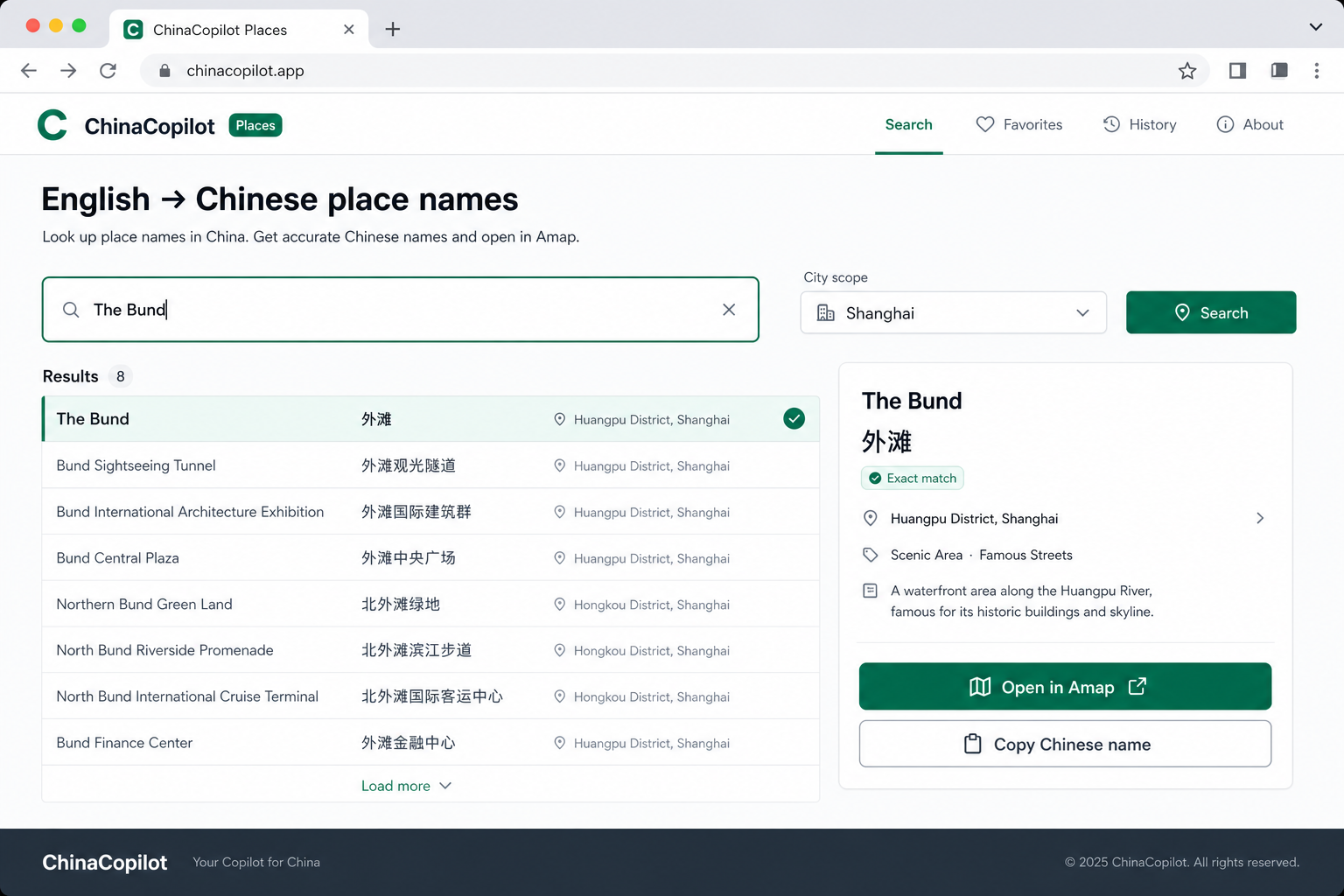
- Open ChinaCopilot Places → English → Chinese name tool
- Type the place in English (e.g.
Yu Garden,Nanjing Road, your hotel name). - Choose city scope (Shanghai, Beijing, All China / HK, etc.).
- Pick the row whose English description matches (mall vs metro station vs scenic area).
- Copy the Chinese name — show it to your driver or paste into Amap search.
- Tap Open in Amap to check the pin on a map (works best in Safari/Chrome, not inside WeChat/Telegram).
Limits (read this):
- Results are Amap listing signals, not guaranteed “the one true name.”
- If two malls share similar English branding, you must disambiguate.
- If lookup fails, try another spelling or city scope (API quotas / keys are server-side).
Step 3 — Give the name to a taxi or ride-hail
Do
- Show the Chinese name full-screen to the driver.
- Add a landmark if needed: “外滩” + a street from your lookup result.
- For Didi/Amap ride-hail, paste the Chinese POI name from the app picker when possible.
Don’t
- Assume the driver knows English hotel brand names.
- Rely on pinyin alone for obscure streets.
- Treat the first search hit as gospel—check the map pin.

Step 4 — Open in Amap from your phone
- With Amap installed: “Open in Amap” tries the native app via
uri.amap.com. - Without Amap: Use the Amap web link on the same screen.
- In WeChat / Telegram in-app browser: Use Open in Safari/Chrome first—maps and install flows break inside WebViews.
Official Amap marker links look like: https://uri.amap.com/marker?position=LNG,LAT&name=...&coordinate=gaode
Common mistakes (and fixes)
| Problem | Fix |
|---|---|
| “No results” in Amap English search | Switch to Chinese keyword from Step 1 or 2 |
| Wrong city | Narrow city scope and search again |
| Hotel brand vs local name | Search street + district in English, pick address-like POI |
| VPN off in mainland | *.vercel.app may not load—use chinacopilot.app or VPN for pre-trip planning |
| Copied name still wrong | Tap “Wrong place? Show other matches” in the tool |
Hong Kong note
Hong Kong uses the same Amap ecosystem for many visitors, but payment and transit differ from mainland RMB rails. For HK-specific money and borders, see Hong Kong hub—separate from mainland checklists.
FAQ
- How do I search Amap in Chinese if I only know the English place name?
- Convert the English name to a Chinese Amap keyword using official Place Search, confirm the POI on the map, then copy the Chinese name for drivers or ride-hail. ChinaCopilot provides a free English→Chinese lookup at /en/places.
- Why doesn't typing English into Amap work?
- Most POIs are indexed in Chinese. English appears inconsistently except on some international brands and airports. Use Chinese keywords and city scope.
- Can I use Google Maps instead of Amap?
- Google Maps is limited in mainland China for navigation. Many locals and drivers use Amap or Baidu Maps. ChinaCopilot deep links target Amap because it is commonly used for POI search and ride-hail.
- Does ChinaCopilot verify every shop name?
- No. We help you find Chinese listing names via official search—not audit every merchant.
- Is this the same as payment / “foreign card OK” tags?
- No. Places also shows payment patterns (typical strip behavior—not shop-by-shop verification). Always reconfirm at the counter.
- Will a browser extension replace this page?
- An extension is for before you fly: select English text on any webpage → get Chinese keywords without opening ChinaCopilot. The full lookup and map links stay on Places.
Try it now
No login. Works on phone and desktop.
Chrome extension (pre-trip shortcut)
Planning from a laptop? ChinaCopilot Place Names for Chrome (coming soon):
- Select any English place name on a blog, hotel site, or PDF → Chinese Amap keyword in one click
- Copy for your itinerary or open Amap in a new tab
- Same official lookup logic as the website—not a separate scraped database
Free tier (planned): 10 lookups/day. Unlimited + saved history: part of Pre-China Toolkit (one-time purchase, optional).
Extension landing pageSources & honesty
- Amap Web Service Place Search (official API docs: lbs.amap.com)
- ChinaCopilot implementation: official APIs only; landmark gloss for famous sites
- Payment and visa rules change—confirm with operators and embassies
ChinaCopilot does not file visas, book trains, or process payments.